Want to save on your Mixbook order? Applying a coupon code is quick and easy!
- Click "Add to Cart" to add your project to your shopping cart.
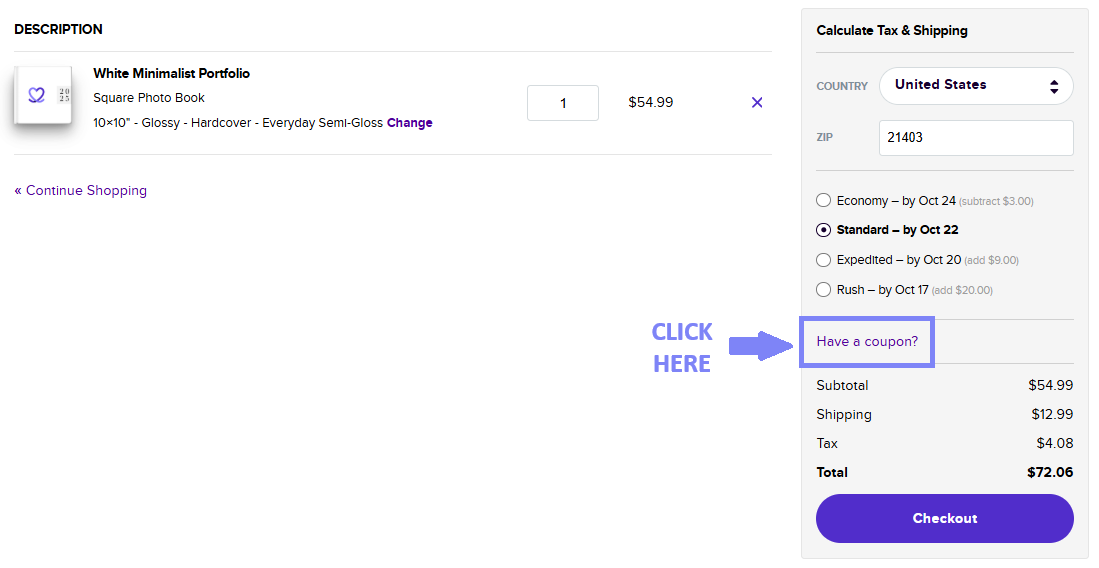
- On the right-hand side of the checkout page, look for "Have a coupon?" under the shipping section.
- Click "Have a coupon?", and a text box will appear.
- Enter your coupon code in the box.
- The discount will automatically apply, and you’ll see your savings reflected below the total.
💡 Pro Tip: Double-check that your coupon code is entered correctly and hasn’t expired. Some discounts may have product or order minimum requirements.